Billing Settings
Billing settings control global defaults for your Tenanta platform: trial configuration, auto-renewal behaviour, currency, payment gateways, security, and registration options.
Navigate to Tenanta Admin → Billing → Settings.
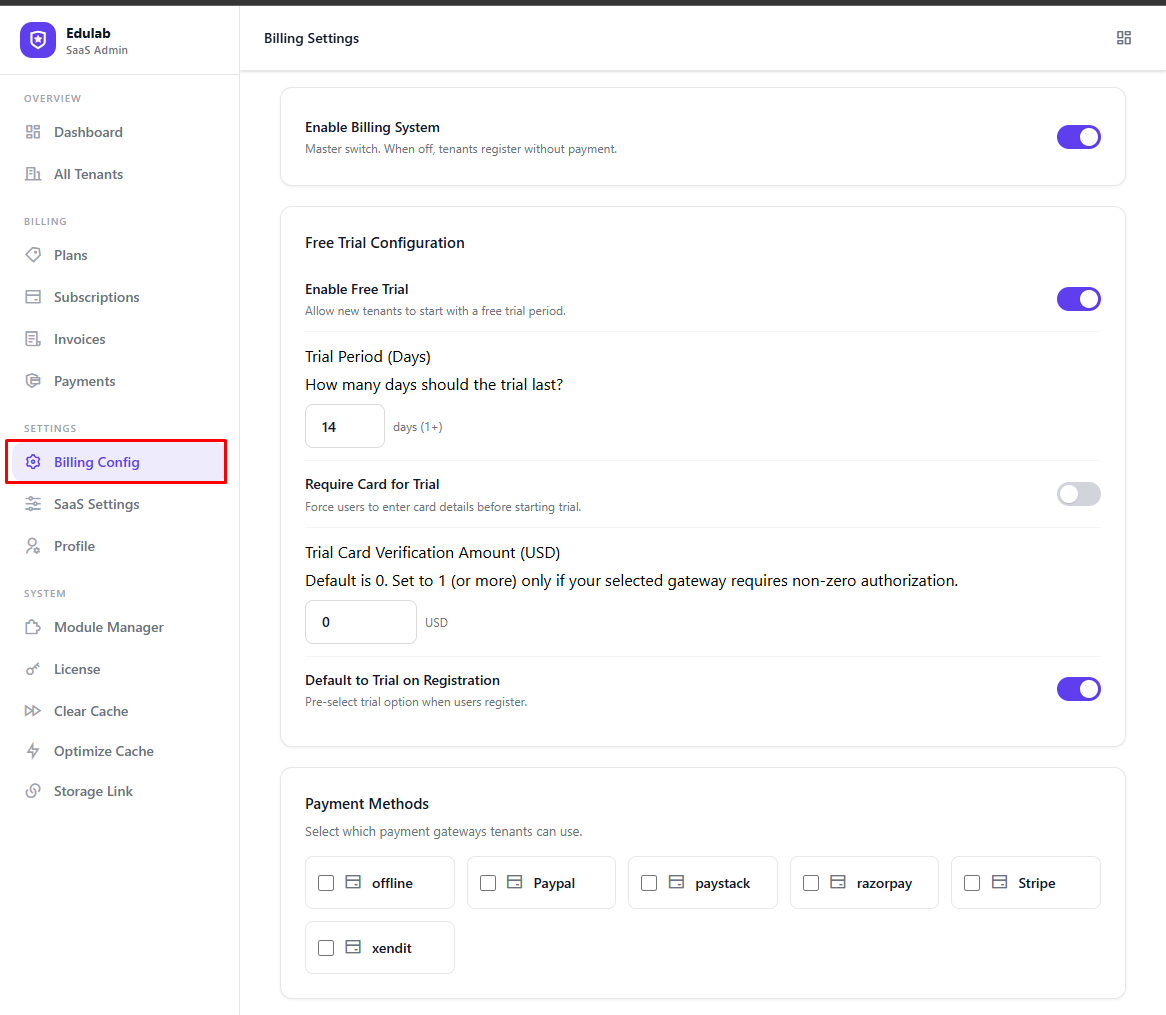
General Settings
| Setting | Default | ENV Override | Description |
|---|---|---|---|
| Billing Enabled | ✓ | TENANTA_BILLING_ENABLED | Master toggle — disabling blocks all billing operations |
| Currency | USD | BILLING_CURRENCY | ISO currency code used for all billing (e.g. USD, EUR, GBP, INR) |
| Currency Symbol | $ | — | Symbol displayed in invoices and the pricing page |
| Invoice Prefix | INV | INVOICE_PREFIX | Prefix added to invoice numbers (e.g. INV-0001) |
| Invoice Numbering | sequential | — | sequential (INV-0001, INV-0002...) or date-based (INV-20250101-001) |
| Default Billing Cycle | monthly | BILLING_CYCLE | Default billing cycle for new subscriptions (monthly or annual) |
Free Plan
| Setting | Default | ENV Override | Description |
|---|---|---|---|
| Free Plan Enabled | ✓ | TENANTA_FREE_PLAN_ENABLED | Allow tenants to register on a free plan with no payment required |
When enabled, the free plan appears on the pricing page and registration form. Free plan tenants are provisioned immediately without payment processing.
Trial Configuration
| Setting | Default | ENV Override | Description |
|---|---|---|---|
| Trial Enabled | ✓ | TENANTA_TRIAL_ENABLED | Offer a free trial to new paid-plan subscribers during registration |
| Trial Days | 14 | TENANTA_TRIAL_DAYS | Number of free trial days before the first charge (minimum: 1) |
| Require Payment Method for Trial | ✗ | TENANTA_TRIAL_CARD_REQUIRED | Whether to collect card details at the start of a trial |
| Trial Card Verification Amount | 0 | TENANTA_TRIAL_CARD_VERIFICATION_AMOUNT | Amount to authorize when trial requires card. 0 = capture/verify only (gateway-dependent) |
Tip: Leaving "Require Payment Method for Trial" off typically increases trial sign-ups. You can collect payment details when the trial ends.
Note: Disabling Trial Enabled affects new signups only — existing trial tenants are not deleted or automatically moved to free.
Trial Lifecycle
- Tenant registers and selects a paid plan with trial
- Tenant database is provisioned immediately (or after card verification if required)
- A trial ending reminder is sent X days before expiry
- When the trial expires, subscription status moves to inactive and tenant access is locked
- Tenant must upgrade or pay to restore access
Auto-Renewal Configuration
| Setting | Default | ENV Override | Description |
|---|---|---|---|
| Auto-Renewal Enabled | ✓ | TENANTA_AUTO_RENEWAL_ENABLED | Automatically charge subscriptions when they expire |
| User Can Disable | ✓ | — | Allow tenant owners to turn off auto-renewal from their billing portal |
| Retry Days | 3 | — | How many days to retry a failed payment before suspending (retry on days 0, 1, 2) |
| Renewal Reminder (days before) | 7 | TENANTA_AUTO_RENEWAL_REMINDER_DAYS | Days before renewal to send a reminder email |
| Trial Ending Reminder (days before) | 3 | TENANTA_TRIAL_ENDING_REMINDER_DAYS | Days before trial ends to send a warning email |
The auto-renewal job runs via Laravel Scheduler. Make sure your cron is configured:
* * * * * cd /path-to-project && php artisan schedule:run >> /dev/null 2>&1Payment Methods
Toggle which payment gateways are available to your customers. Gateways are stored in the tenanta_billing_payment_methods database table.
| Gateway | Notes |
|---|---|
| Stripe | Credit card — most reliable for global use |
| PayPal | Popular for international customers |
| Razorpay | Recommended for India |
| Paystack | Recommended for Africa |
| PayU | Recommended for Latin America & Eastern Europe |
| Xendit | Recommended for South-East Asia |
| Offline / Bank Transfer | Manual — admin must verify payment |
Enabling a gateway here makes it visible on the checkout page. You must also configure the gateway API keys — see Payment Gateways.
Default Enabled Methods
On first bootstrap (empty tenanta_billing_payment_methods table), the following gateways are enabled automatically: Stripe, PayPal, Paystack, Razorpay, Offline.
Registration Settings
| Setting | Default | ENV Override | Description |
|---|---|---|---|
| Email Verification Required | ✓ | TENANTA_REQUIRE_EMAIL_VERIFICATION | Tenants must verify email before billing features activate |
| Trial as Default | ✓ | TENANTA_REGISTRATION_TRIAL_DEFAULT | During registration, "Start Free Trial" is selected by default |
| Allow Immediate Payment | ✓ | TENANTA_ALLOW_PAY_NOW_OPTION | Also offer "Pay Now" during registration |
| Min Password Length | 8 | TENANTA_MIN_PASSWORD_LENGTH | Minimum password length for tenant owner registration (range: 6–64) |
| Require Password Confirmation | ✓ | TENANTA_REQUIRE_PASSWORD_CONFIRMATION | Show a "Confirm Password" field during tenant registration |
Security Settings
| Setting | Default | ENV Override | Description |
|---|---|---|---|
| Require Payment Verification | ✓ | TENANTA_REQUIRE_PAYMENT_VERIFICATION | Verify payment transactions before activating subscriptions |
| Enable Audit Logging | ✓ | TENANTA_ENABLE_AUDIT_LOGGING | Log all billing settings changes with old/new values and admin ID |
| Encrypt Payment Data | ✓ | TENANTA_ENCRYPT_PAYMENT_DATA | Encrypt sensitive payment data at rest |
Warning: Disabling these security settings is not recommended for production environments.
Saving Settings
After making any changes, click Save Settings at the bottom of the page. Changes take effect immediately — no cache clearing or server restart needed. Settings are cached for 1 hour.
Note: Currency changes do not retroactively update existing invoices. Invoices always display the currency that was active when they were created.