Tenant Management
Tenants are your customers' LMS instances. Each tenant has its own isolated database, subdomain, and billing record.
Navigate to Admin → Tenanta Admin → Tenants to see all tenants.
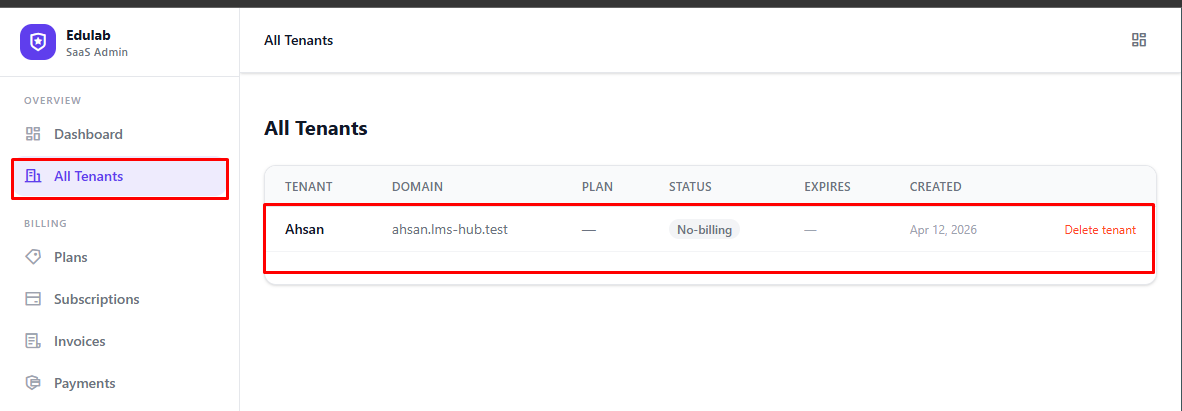
Tenant List
The tenant list shows:
| Column | Description |
|---|---|
| ID | Tenant UUID |
| Subdomain | e.g. acme.yourdomain.com |
| Owner | The email that registered this tenant |
| Plan | Current subscription plan |
| Status | active, inactive, suspended, cancelled |
| Created | Registration date |
Viewing Tenant Details
Click any tenant row to open the details page.
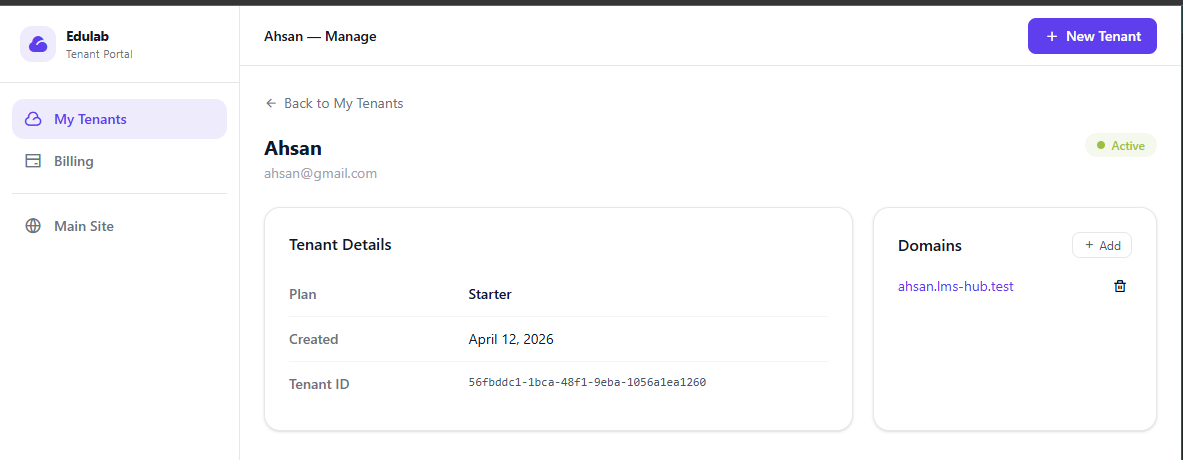
The details page shows:
- Tenant metadata (subdomain, created date)
- Owner information (name, email)
- Active billing — plan, period start/end, status
- All associated domains (subdomain + any custom domains)
- Recent invoices
Adding a Custom Domain
On the tenant details page, scroll to the Domains section and click Add Domain.
Enter the domain (e.g. lms.acme.com) and click Save.
Important: The tenant's DNS must have a
CNAMErecord pointinglms.acme.comto your server's domain (or anArecord pointing to your server IP). Without this, the custom domain will not resolve.
Removing a Domain
Click the Remove button next to any secondary domain. The default subdomain (acme.yourdomain.com) cannot be removed.
Tenant Provisioning
When a tenant self-registers, the system:
- Creates the
Tenantrecord in the central database - Creates the
Domainrecord (subdomain) - Creates the
TenantOwnerrecord with credentials - Sets up a new database (named
tenant_{uuid}) - Runs all tenant-scoped migrations
- Creates the tenant admin user
- Assigns the admin role
If TENANT_PROVISIONING_DRIVER=queue, steps 4–7 happen in the background via a queued job chain. The user sees a "being set up" page while they wait.
If TENANT_PROVISIONING_DRIVER=sync, the entire process runs during the HTTP request (slower response but simpler to configure).
Troubleshooting Failed Provisioning
If a tenant's LMS was not set up correctly:
- Check
storage/logs/laravel.logfor errors - Verify the tenant database exists:
SHOW DATABASES LIKE 'tenant_%' - Re-run migrations for the tenant:
php artisan tenants:migrate --tenants={tenant_id}- If the tenant admin user is missing, the
CreateTenantAdminJobmay have failed. Re-dispatch it:
php artisan tinker
# Then:
\Modules\Tenanta\Jobs\CreateTenantAdminJob::dispatch($tenant);